Rubric Based Grading Tool
I built this as a reusable grading assistant for reasoning-heavy coursework. It can read a question set, generate a rubric draft, let the professor revise that rubric, grade submissions in batch, and evaluate how closely the results match professor judgment.
The name Grade Master is intentionally a little playful. The tool obviously cannot replace a PhD student or a professor, so the interface is built around review rather than automation alone. My main goal is to reduce repetitive grading workload while keeping the scoring standard, the rubric edits, and the final decisions in human hands.

Overview
The project started as a rubric grading tool, but I wanted to push it toward something professors could actually reuse. It now supports question intake, rubric generation, rubric revision, batch grading, human review, evaluation against professor scores, and calibration based on grading errors.
I came up with this project because reasoning is the problem that currently hooks my interest the most. It is not only about whether a model can produce a polished answer. It is about whether the model can keep track of hidden steps, preserve constraints, and notice when a conclusion has been smuggled in without enough support. In grading, those small gaps matter. They are the loose screws inside an otherwise elegant machine.
My first idea was simply to make a rubric-based grader. After building it, I realized the more useful version should begin earlier in the workflow. A professor should be able to upload the question file, receive a generated rubric, modify that rubric if needed, and only then run grading on student submissions. Moving from a single grading prompt to a full review workflow made the project feel less like a calculator and more like a small lab for testing model judgment.
After several trials, I also tested the same submissions with three prompt variants. Prompt v3 produced the closest alignment with professor grades, so I selected it as the base prompt before continuing into calibration. From there, the system no longer treats grading as a one-shot output. It becomes a loop: grade, compare, revise, and evaluate again.
After testing the tool first on Algorithms and Theory of Computing, I started thinking about how to make it useful beyond one course. The broader version should work across disciplines where students have to explain a line of reasoning, not just produce a final answer. In the economics example shown in the interface, the same workflow is tested on a policy reasoning question about congestion pricing, public transportation subsidies, incentives, and social welfare.
That is why the review function matters so much. Grade Master is not designed as a replacement for expert judgment. It is designed as a workload reduction tool where the professor remains the authority over the rubric, the disputed cases, and the final approved score.
Why this course
CS302: Algorithms and Theory of Computing is a strong benchmark because its answers depend on structured reasoning. Students need to construct proofs, explain reductions, compare formal models, and justify conclusions with enough precision to deserve partial credit.
This makes the task more informative than ordinary answer matching. A system may recognize the right theorem but miss the proof logic. It may assign a plausible score while ignoring a constraint in the question. Those failures are exactly the cases I want to study, because reasoning mistakes often hide in the basement of the answer while the front door still looks perfectly respectable.
Evaluation risk
Student answers vary in length, notation, and reasoning order. The model must distinguish correct compression from missing logic, which is difficult for surface-level matching.
Benchmark value
The course exposes cases where binary correctness is too crude. Scores need to reflect partial construction, incomplete proof steps, and explanations that are valid but differently phrased.
From rubric grading to reusable grading support
I want the project to move beyond a one-time demo. The reusable version should support the full grading path. A professor brings the assessment file and the student submissions, while the system helps with parsing, rubric drafting, controlled grading, result review, evaluation reporting, and calibration.
This is also why I want the tool to perform two related tasks. On one side, it can grade reasoning submissions from different disciplines once the user provides the question, rubric, and student answers. On the other side, it can become an evaluation tool when the user also inputs ground-truth professor grades. In that mode, Grade Master is not only producing scores. It is testing whether those scores actually behave like a professor's grading standard.
The key design idea is that the professor should not have to start from a blank rubric every time. The system can generate a first draft, but that draft remains negotiable. The professor can accept it, reject it, or revise it before the model grades anyone. In this sense, the tool carries the heavy basket, but it does not decide where the basket should go.
Six checkpoints from question intake to calibration
Question review
The professor begins with the question file. The system extracts question ids, point values, and prompt text, then shows the structured version so mistakes can be caught before any rubric is produced.
Rubric revision
The rubric is generated as a draft rather than a hidden instruction. The professor can approve it, ask for another version, or edit the scoring language directly when the model misses the intended standard.
Prompt testing
I tested the same submissions with three prompt variants. Prompt v3 produced the closest alignment with professor grades, so I used it as the base prompt before moving into calibration.
Submission batch
Student answers can be uploaded through JSON or CSV. The interface checks required fields and lets the user run a small batch first, which makes the tool safer for classroom testing.
Grading result
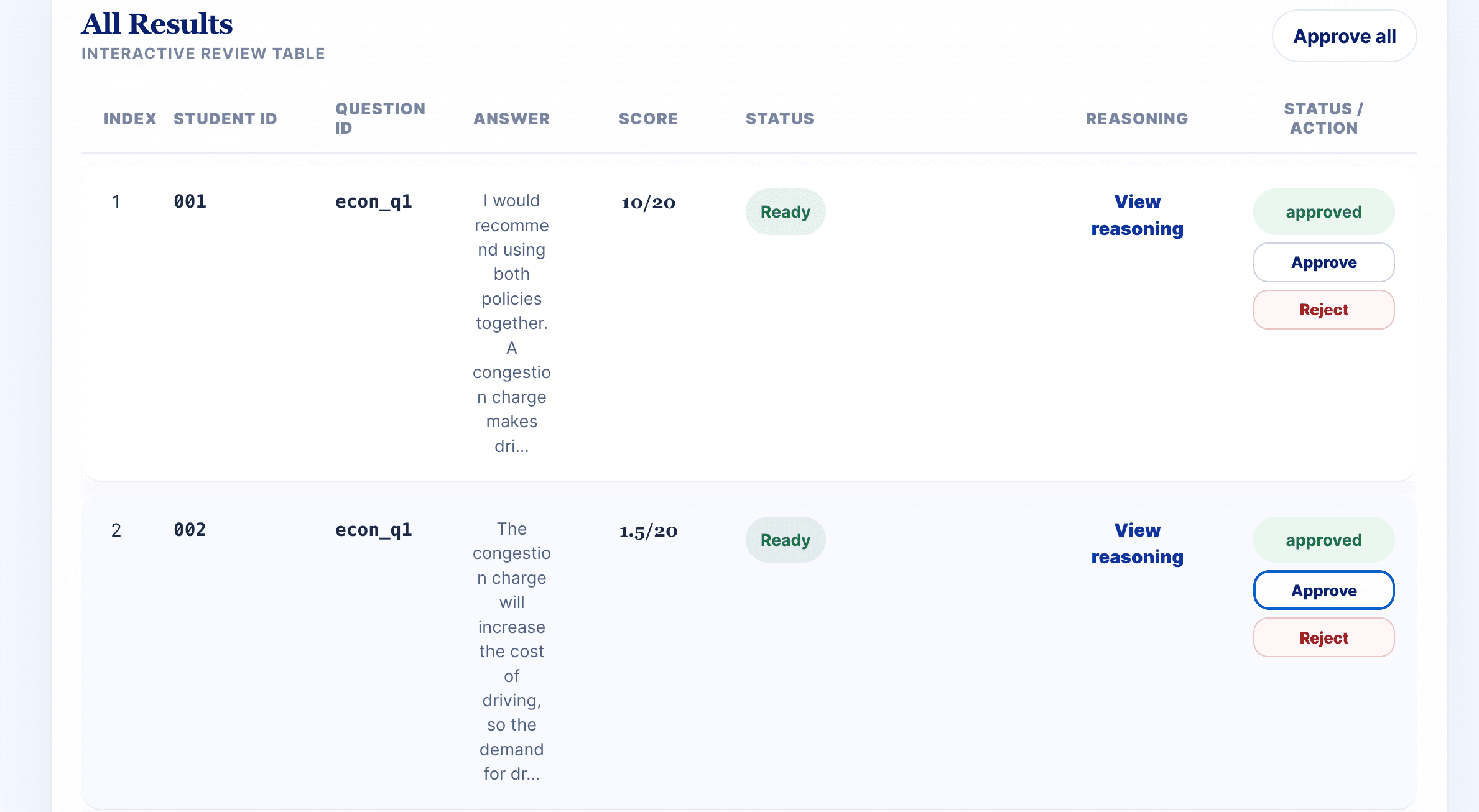
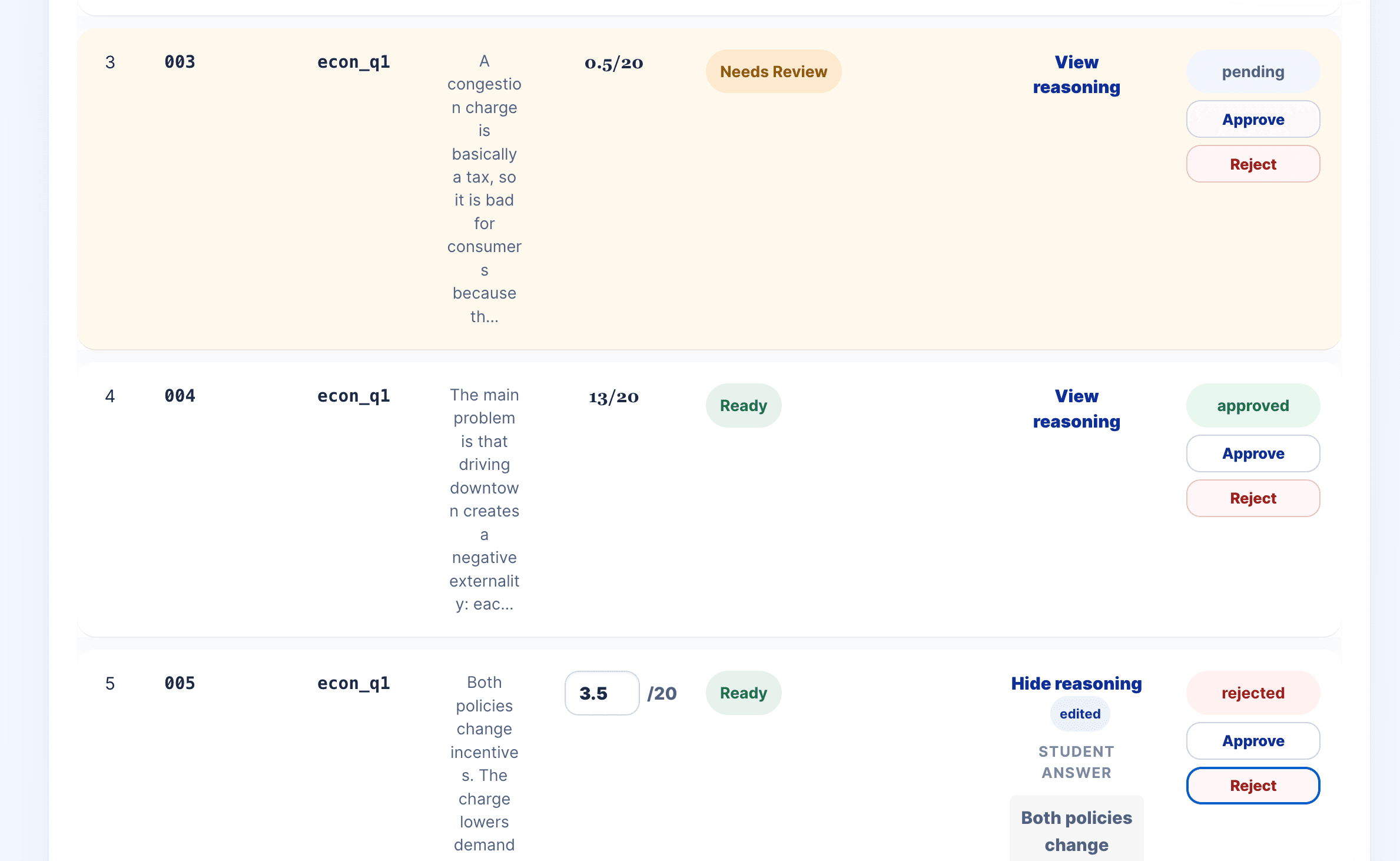
The grading table returns scores, reasoning, status labels, and approval controls. It is built for review because grading support should reduce workload without removing judgment.
Evaluation and calibration
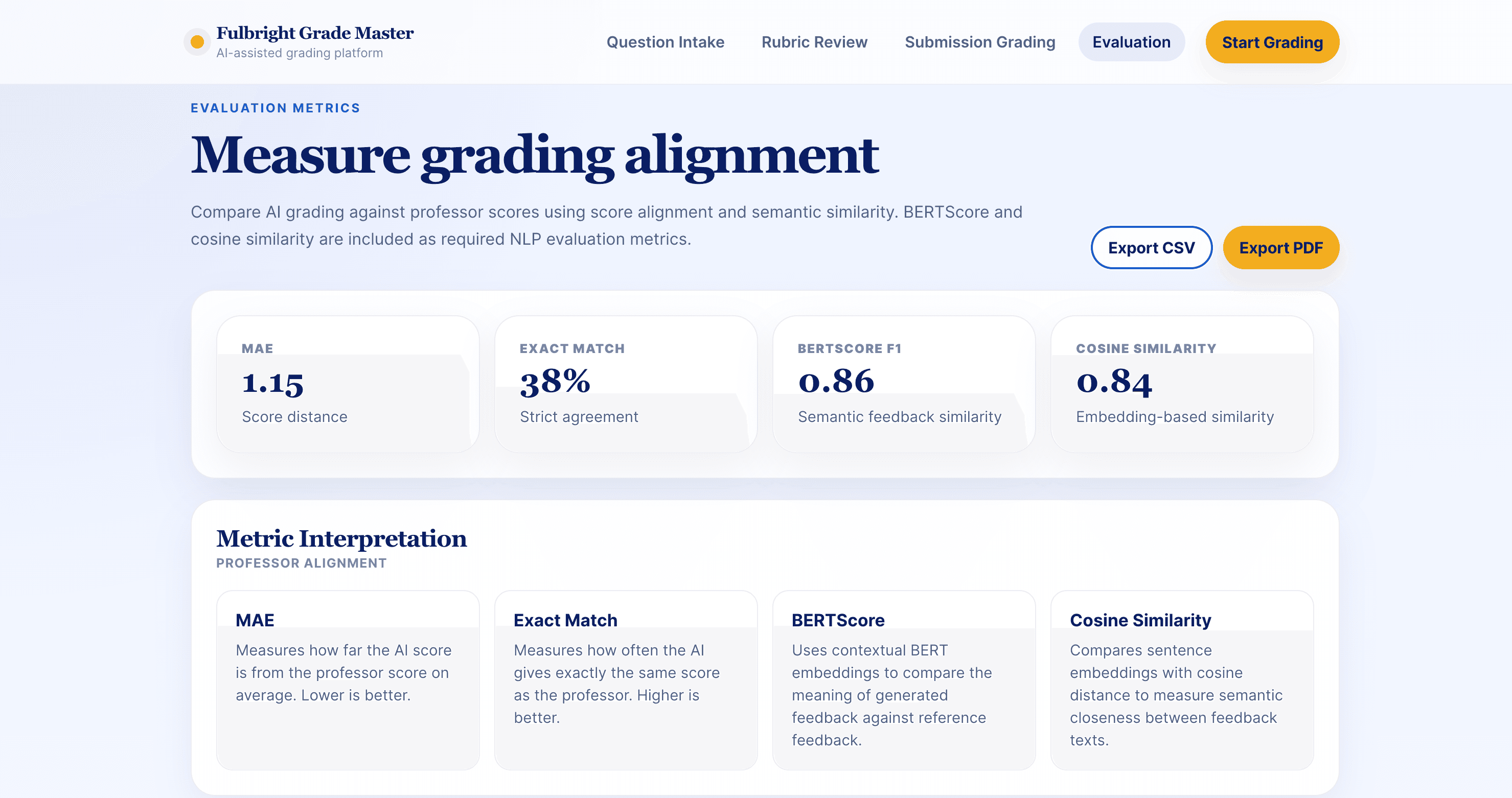
The evaluation page compares AI scores with professor scores, reports error metrics and variance, and supports calibration rounds where the rubric is revised based on disagreement patterns.
The most important design choice is that rubric generation does not immediately trigger grading. A generated rubric can be useful, but it can also miss the professor's intention. Approval and revision are therefore built into the workflow before the model touches student answers.
Interface report
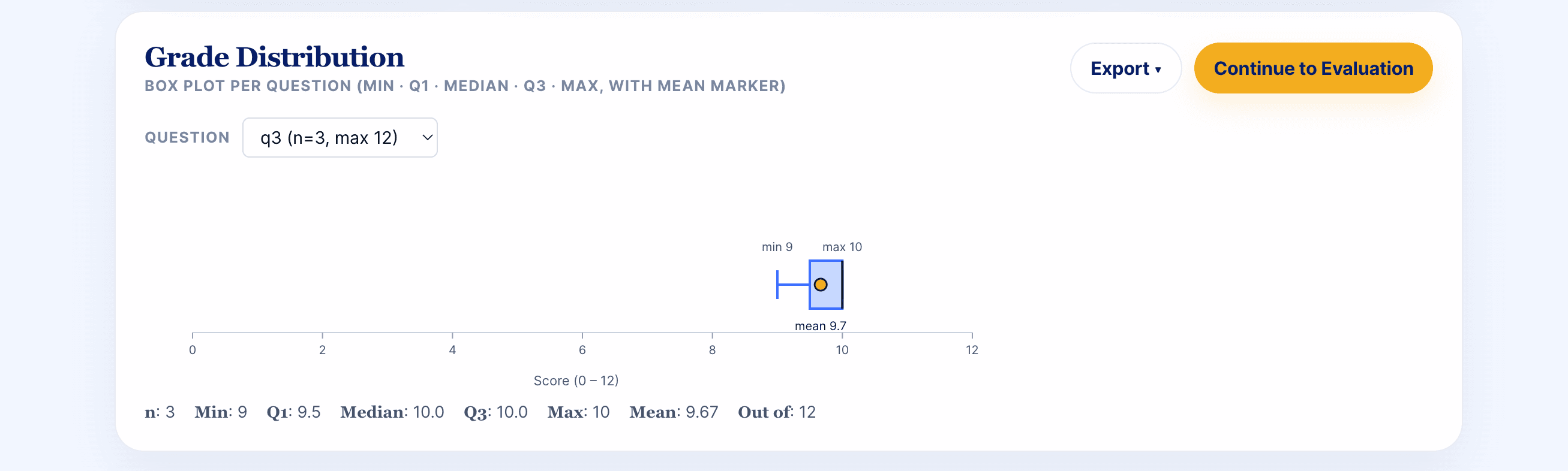
The current interface is organized like a report that the user can operate. Each screen corresponds to a pipeline checkpoint, and each checkpoint leaves an artifact that can be inspected: parsed questions, revised rubric text, uploaded submissions, grading results, distribution summaries, and evaluation metrics.
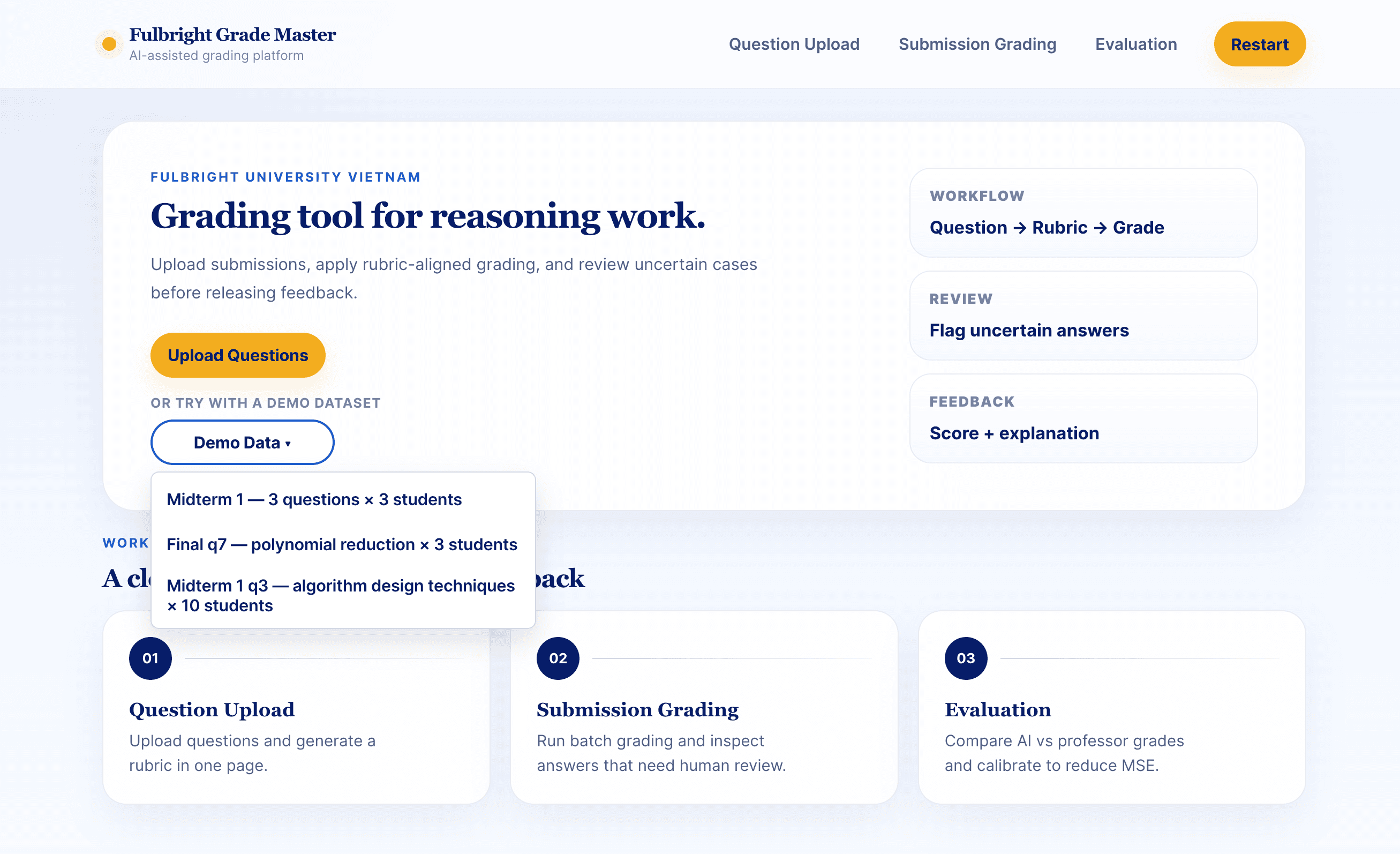
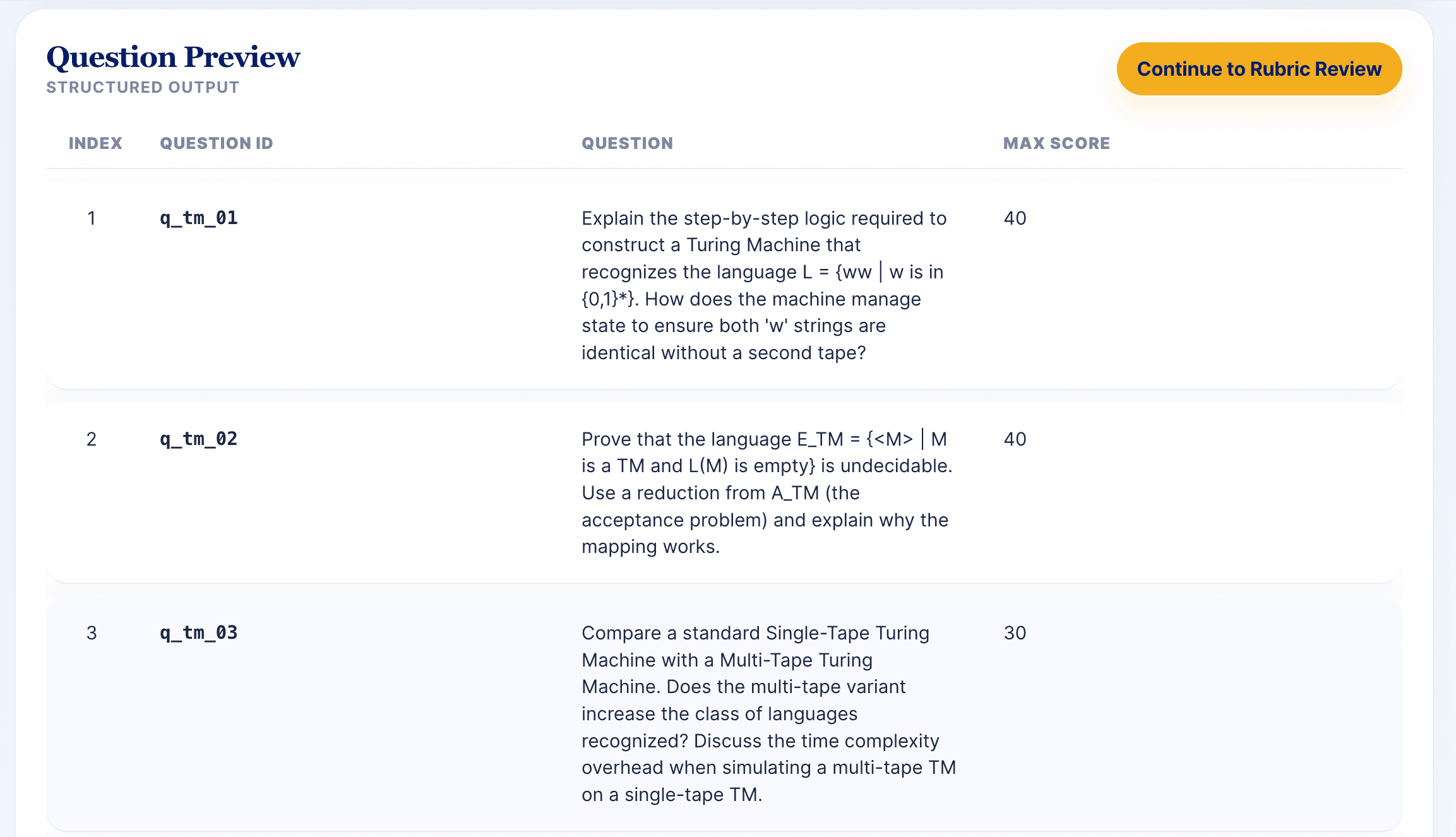
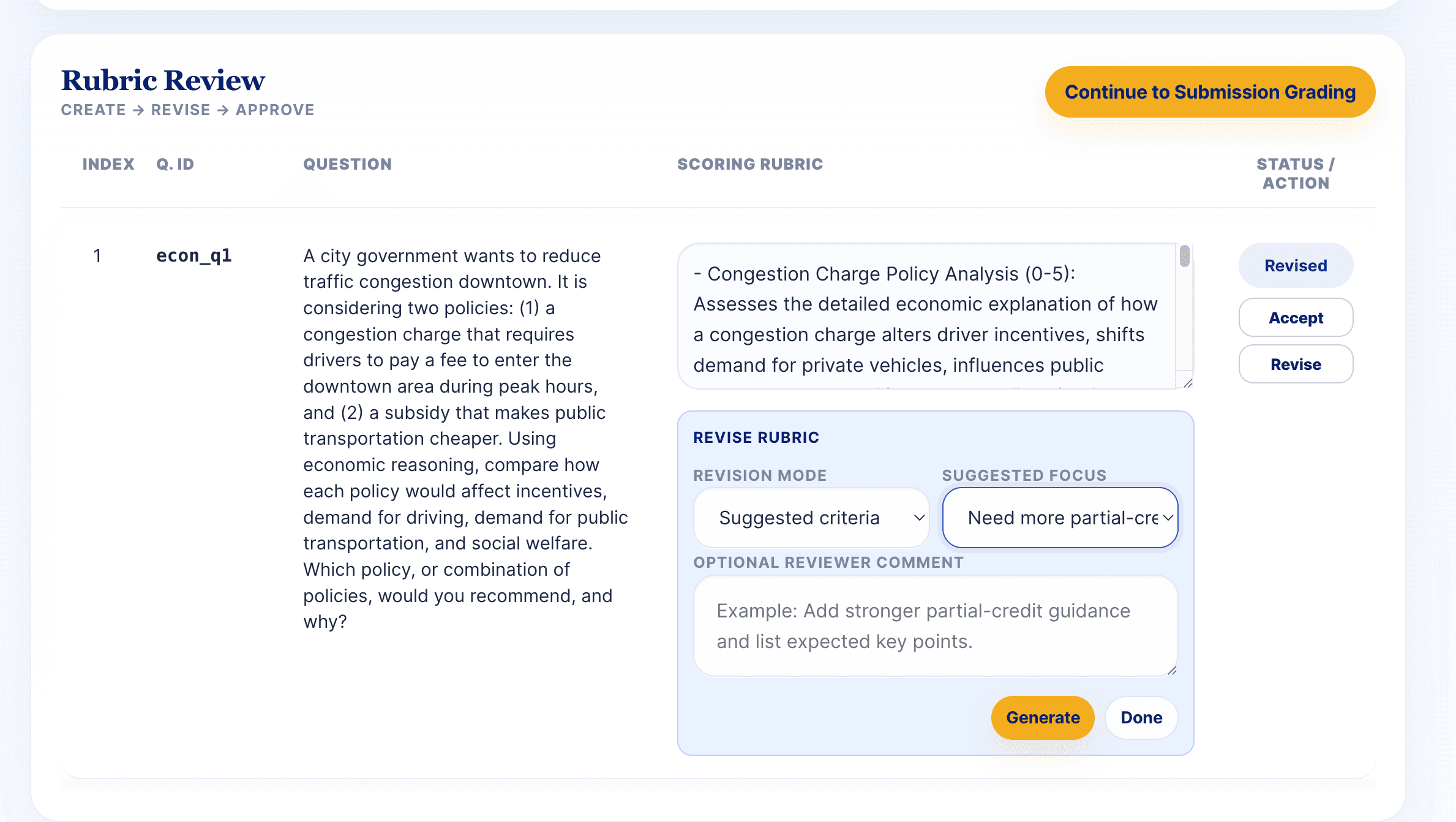
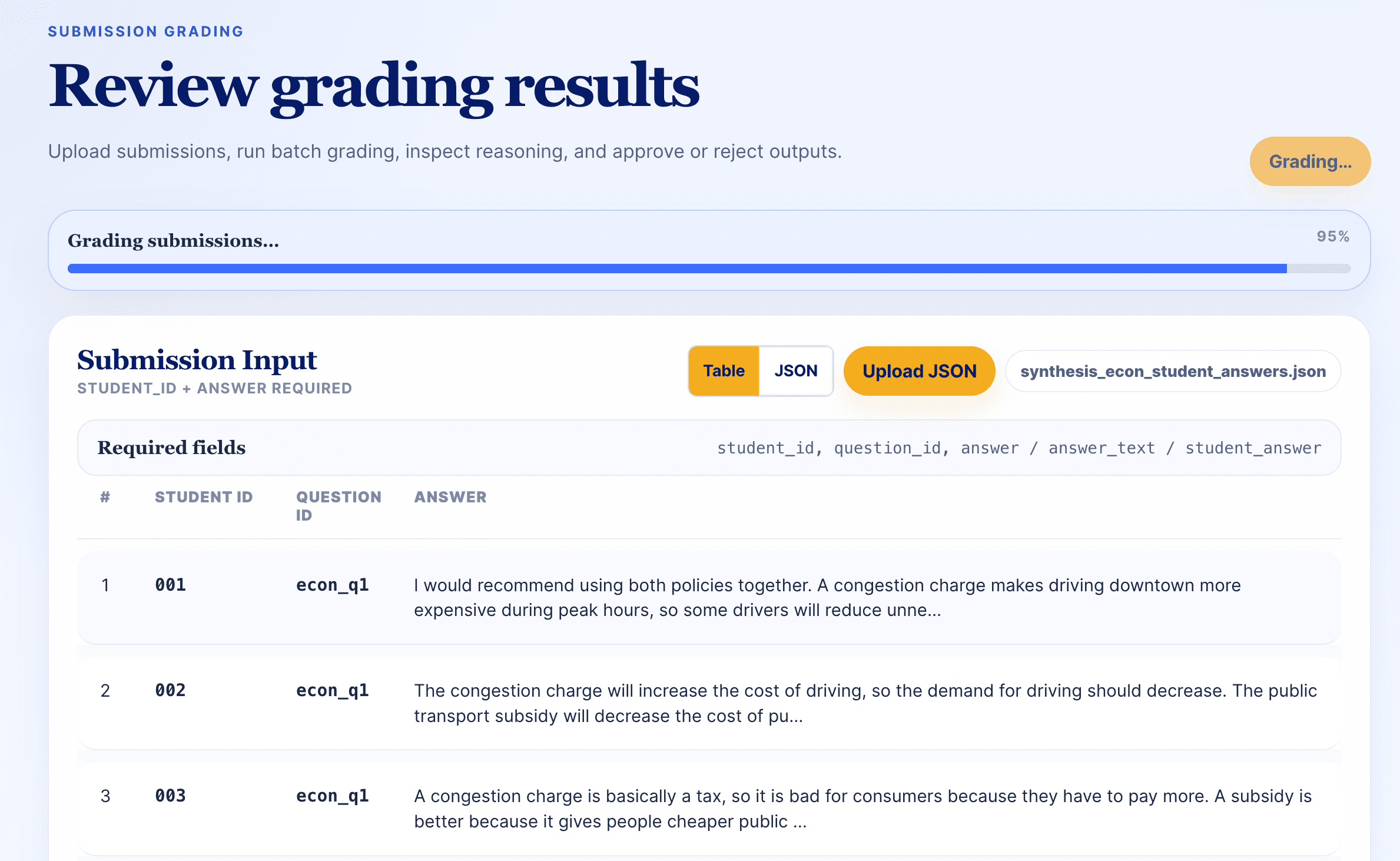
Pipeline
Under the interface, I do not want this to be just one prompt with a nicer screen. The project is closer to a staged evaluation pipeline where every stage produces something checkable. For me, this is where the research question becomes tangible. Instead of only asking whether models can reason, I can watch where the reasoning bends, where it breaks, and which review mechanisms make the break visible before it reaches a final grade.
Question file → structured extraction → rubric draft → professor revision → prompt variant testing → selected prompt v3 → approved grading standard → submission batch → model score and reasoning → uncertainty flag → review decision → evaluation against professor grades → calibration.
Preprocessing
Preprocessing is treated as a reliability layer rather than a small setup task. The system must normalize question files, preserve point values, remove formatting noise, and map student answers to the correct question ids before the grading model sees any content.
This matters because extraction errors become evaluation errors. A strong prompt cannot recover from missing context, broken question segmentation, or an answer assigned to the wrong item. A beautiful metric is useless if the wrong student answer is being compared with the wrong professor score.
Rubric building
Rubrics function as alignment targets. They convert instructor expectations into explicit scoring criteria, partial credit rules, and review triggers that can be audited after the model produces a score.
The generated rubric is therefore surfaced as a draft, not hidden inside the prompt. A professor can approve, revise, or reject the standard before batch grading starts, which keeps authority over the grading policy with the human reviewer.
This is also where I started to see the project moving beyond the initial idea of a rubric grader. The stronger version is a reusable rubric workflow: question in, rubric draft out, human revision in the middle, and grading only after the standard has been reviewed.
Prompt strategy
Before calibration, I tested three prompt variants on the same submission set. The goal was not to find the prettiest instruction, but the prompt that behaved most consistently when compared with professor grades.
Prompt v3 gave the closest alignment, so I selected it as the base prompt for the next phase. This made the pipeline more disciplined: instead of constantly changing the prompt by intuition, I first chose the strongest prompt empirically, then used calibration to refine the rubric and grading behavior.
This changed how I understand prompting. A prompt is not just wording. It is a grading policy. A strict prompt can protect against over-crediting vague answers, but it can also erase partial reasoning. A more flexible prompt may recognize incomplete insight, but it may become too generous. The useful prompt has to balance judgment and discipline.
Prompt v3: Professor-aligned grading
After comparing three prompt variants, I selected Prompt v3 because it best matched the professor grading pattern. It treats the rubric as the main authority, but still allows the model to recognize compressed yet valid reasoning in timed written exams.
Grade like a careful professor grading a timed written exam.
The rubric is primary, but use the reference solution to understand acceptable reasoning patterns.
Award credit for conceptually correct reasoning even when the student skips intermediate formal steps, as long as the intended logic is clear and mathematically sound.
Do not over-penalize missing textbook phrasing when the core complexity-theoretic idea is correct.
Use partial credit generously when the student demonstrates the right direction and most of the underlying logic.
Reserve major deductions for reversed reduction direction, incorrect complexity-class claims, invalid conclusions, or missing core proof structure.
Calibration
After selecting prompt v3, I moved into the calibration phase. Here, the system compares AI grades with professor grades, identifies where the model over-credits or under-credits students, and uses those disagreement patterns to revise the rubric.
This makes grading less like a one-shot prediction and more like a feedback loop. The model grades, the evaluation reports the gap, the rubric is revised, and the next round checks whether the revision actually moves the AI closer to the professor standard.
The important part is that calibration does not only chase a lower average error. It should also produce a more meaningful rubric: clearer criteria, better partial-credit guidance, and stricter handling of blank, off-topic, or contradictory answers.
Evaluation
Evaluation is the part that makes the project feel less like a nice interface and more like an actual grading tool. I compare AI scores with professor scores because the model should not only sound reasonable. It should stay close to the human grading standard across real submissions.
I added multiple evaluation metrics because one number is too thin for this task. MSE and MAE measure score error. Exact match checks strict agreement. Pearson and Spearman show whether the model follows the professor's score trend and ranking. Variance helps me inspect whether the model's scores are too compressed, too spread out, or unstable across submissions.
I also include semantic metrics because grading feedback is a text generation problem, not only a scoring problem. BERTScore and cosine similarity help me inspect whether the generated feedback remains meaningfully close to reference reasoning even when the wording is different.
| Metric | Purpose |
|---|---|
| MSE | Penalizes larger score gaps more strongly, which helps reveal serious grading mistakes. |
| MAE | Measures the average absolute distance between the model score and the professor score. |
| Variance | Checks whether the model score distribution is too compressed, too spread out, or unstable across submissions. |
| Exact Match | Tracks how often the system assigns exactly the same score as the professor. |
| Pearson Correlation | Checks whether model scores follow the same linear trend as instructor scores. |
| Spearman Correlation | Tests whether the system preserves the ranking of student answers. |
| BERTScore | Compares semantic similarity between generated feedback and reference reasoning when wording differs. |
| Cosine Similarity | Measures closeness between text embeddings to inspect meaning beyond exact phrasing. |
I read these metrics together rather than treating one number as the final answer. A run can have acceptable average error but still misrank students. A score can also look plausible while the feedback remains too generic. The evaluation report helps identify where Grade Master is useful and where professor review is still necessary.
Where this is going
The immediate next step is to make calibration more interactive. Instead of running several rounds in one long request, I want the interface to show a round-by-round timeline: grade, compare, revise, inspect the rubric change, and decide whether to continue.
I also want the evaluation report to become more diagnostic. The system should not only say that the AI was wrong. It should say what kind of wrongness appeared. Did it over-credit short answers? Did it punish incomplete but valid reasoning? Did it miss a specific rubric component? Those patterns are more useful than a lonely metric card.
Longer term, I want this to become a general grading support workflow rather than a fixed course demo. Different professors should be able to bring different question sets and still keep control over the rubric, the review threshold, and the final score. The model can help with scale, but the classroom standard should remain reviewable by humans. That balance is what makes the project exciting to me. It turns a classroom workload problem into a practical way to study AI reasoning with the lights on.